Windows 8 Release preview : Balu’s vLog

Microsoft has launched Windows 8 release preview last week. It’s much more matured than the developer and consumer preview. The Metro UI is awesome and I’m sure it’s going to be a great OS for tablets. Unlike static icons in existing tablets like iPad and Android (No offense :)), Live tiles seem to be unique and fantastic.

I’m not sure how Microsoft will manage to bring the same OS for both tablets and PCs. Let’s wait and watch.

Here is my review on Windows 8. It’s my first video log and my voice is really funny :).

Warning: Watch it at your own risk.


I know what you people think now. I thought the same :D. Negative comments appreciated!


The New iPad

Apple has revealed its next iPad. While we were expecting the iPad3, apple has named it as just ‘The New iPad’.

By watching the 1.5 hour keynote from their website, I understood that it does not have a revolutionary factor. Of course, we cannot expect a major change or innovation from every apple product release 🙂  Still it has some interesting features.

Retina display:

iPad comes with the Retina display and Apple calls its as Resolutionary. 🙂 Yes!! The display would be stunning with 2048*1536 resolution. The question is, is it really required to bring those many pixels to a 9.7-inch display?

A5 X Chip:

The processor is really faster than the older one. Of course, every new product would have the new advanced processor than the previous. So this is not a jaw-dropping feature.

iSight 5 MP camera and HD recording:

The rear camera is now 5 Mega Pixel. Apple says that it comes with advanced optics. HD video recording is possible with auto stabilization. Holding the iPad firmly and shooting videos is bit hard due to its flat shape. So bringing in the video stabilization feature makes sense.

Voice dictation:

It is just Voice dictation that translates the voice to texts.The software does not type in a comma and full stops unless you specifically say ‘Period’ and ‘Comma’ in between the sentances. Unavailability of Siri is a big disappointment. Apple might have thought that iPhone’s sale would come down if it includes those features in iPad.  🙂

4G LTE:

iPad now supports 4G LTE. 4th generation networks are really faster than 3G. That’s a good feature for the people who live in the country that has 4G networks. In India, we are still not using the 3G networks due to its costs. 🙂

Apps from Apple:

Updated apps like iMovie and Garageband are interesting and good to have with this new iPad. The best part is the inclusion of iPhoto of iLife family. It looks great and editing becomes simply easy with a couple of touches.

Apple confirmed iPad’s release on March 16 in the US and few countries. Rest of the countries will have it on March 23 but India is nowhere in any of the lists.

That is all about The New iPad. When I go to the United States I would definitely buy an iPad. 🙂

The Metro style

Microsoft’s Metro design User Interface has become quite popular after the launch of Windows Phone. In this article, I’m going to give an introduction of Metro UI design of windows Phone and Windows 8 operating system.

What is Metro UI and how does it look?

Well, Metro UI is built based on Swiss design language and resembles like signboards that we see in our day-to-day life in traffic signals, coffee shops etc.


    

It mainly focuses on the content than UI elements. Windows 8 and windows phone has a unique interface that gives more information on a glance with minimal actions.

Simple info graphics and an ordered layout make a good Metro design.

Metro Design Principles: (Stated by Microsoft)

Microsoft follows the below design principles for its Metro based UI.

Clean, Light and Fast

Removing any elements in the UI that are unnecessary helps in focusing on the principal tasks of the UI, and makes the UI feel good, fast, and responsive.

Alive in Motion

The transitions between screens in a UI are as important the design of the screens themselves. Flip to back transition gives life to a UI and communicates well with the navigation system.

Typography

Giving importance to typography makes the content more visible, clear and straightforward. It pays attention to the scale and weight.

Content, Not Chrome

It’s the content on the phone that people want, not the polished buttons. Reducing the visuals on the phone that aren’t content will help in direct interaction with the content.

Authentically Digital

A user interface is created of pixels; With Metro design Microsoft avoids using the shading and glossiness used in most of the software interfaces.

User Interface Elements – Windows Phone 7 and Windows 8:

Information is organized in a Content hub. Accessing and navigating to the contents are done using a set of UI elements specified below.

Live Tiles

Tiles are bigger than icons and they are dynamic. Unlike static icons, live tiles gives brief information and dynamically changes its content based on events.

For example, a calendar tile shows up the today’s events and email tile will show you how many unread emails you have.
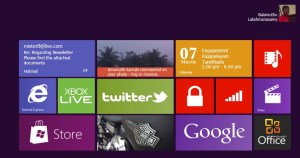
This is a screen shot of windows 8-pre beta. It resembles like windows phone. Applications are listed as tiles directly on the start screen than hiding in a Programs menu. Now Start menu is just another app in windows 8.

 Pivot and Panorama HUB

Pivots are more like a Tabbed control that splits the window in to several logical categories. It can be used to show multiple aspects of same content.

Panorama view gives a birds eye view of the available contents. It uses a combination of image blocks and texts that provides a visual communication.

So finally, Future Microsoft’s operating systems would have this Metro standard. You can download the Windows 8 developer preview to experience the interface by installing it in a virtual machine.

It comes with a pre installed Visual Studio 2011.So you can also get your hands on Windows 8 app development.

Happy designing, coding and engineering!!

Real books and the other kind

Reading books is the universal way of gaining knowledge.

Once there were manuscripts written on palm leaves, clay tablets that passes information to their generations. Later we had hand written books inked with pen. Then came the printed books.

Till this day we use the printed books and consider it as the appropriate way for reading and learning.

But now, the technology has changed the way we read books. Surfing the digital library and downloading electronic versions of books to devices like Kindle, iPad and Smart phones has become a common trend.

Are these devices a complete replacement of real books or just a ballyhoo? So here is my personal opinion and comparison of the different kinds of books.

Real books:

Books are the best companion to a man.
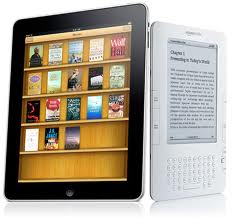
Reading books in a sepia-toned paper is what I love to do. I’m a solitary reader and I always prefer to read in paper-books and delve in to the imagination. The feel that gives you while  reading line by line, flipping through the pages and getting lost in another world by the author’s creativity is something that can’t be explained.


Audiobooks:

We learn about our culture and history from our grandma’s bedtime stories during childhood.

Audio books give you same kind of feel when you plug in the earphones and cuddle in your bed. I heard few chapters of Harry Potter and lost in to the captivating story. But some audio books would sound just like TV news. It all depends on the narration.

An Audio book with a good narration is another choice when you don’t want to open a book. You can also finish the book much sooner than reading.

Electronic Books:

During my college days, I wanted my texts books to have search feature 🙂 I spend most of the time finding a topic and then have very less time for studying.

Now we have brilliant devices like Kindle and iPad, which gives you the best reading experience and incorporates search and much more useful feature on it.

I have seen animated video playing on newspapers in sci-fi movies.

iBook 2 does that. It has videos, animations, key notes and many more useful features on a book. They are very interactive.

Finally each has some benefits over the other and it all depends on our personal choice. Currently I’m reading The Fountainhead book and I have printed, electronic and audio versions of it. I read it in all possible ways, whichever is convenient at that moment 🙂

And the bottom-line is, digital versions may be smarter but they are no way equal to a real book.

Happy reading 🙂

My Computers

I feel like writing something whenever I get up early. For some unknown reason I’m thinking about my old PCs and wanted to post a blog.

My first PC was a desktop bought somewhere in 2004-2005. I had to convince my Mom and Periyama very hard to get one for me. My Mom finally said ok and got me a PC with the help of my cousins Arun and Raj. The config was pretty decent. It had a Intel Celeron processor with 40 GB hdd and a 256 MB of RAM. I installed dual OS – Windows 98 and XP.

I’m not impressed with its performance, so a couple of months later I changed almost all the internal parts. I upgraded it with an AMD processor, gigabit motherboard, 80 GB hdd, 512 MB RAM and a DVD reader. The monitor and CPU case were the same. I spent more than 10,000 rupees from my mom’s wallet 🙂

Having that PC at home, I learned a lot of multimedia software but created nothing out of it 🙂 I used it to the core and experimented in all possible means. After 4-5 years it gave me lot of trouble and it was a burden for me to carry that desktop whenever I change my room. So I sold it for 4500 INR and I did own any computer for the next 1 year.

In 2009 I bought a HP laptop for 46000 INR. This one helped me find a university for my part-time post graduation. I sold it after 2 plus years of hard-core use and now I own a MacBook PRO. I’m planning to upgrade the RAM from 4 to 8 Gig.

I have this habit of upgrading /altering my computer like some people do it for their new bikes and cars 🙂

Everything we own and use will benefit us in some ways and brings change over the period of time!

The VideoBee app – My first Windows Phone 7 project

I’m planning to develop an app for my windows phone 7 that streams video from IP cameras and renders. There is a hell lot of apps already available in Market Place that does the same. But I want to create one on my own. I will be posting the updates on my blog frequently.

Here we go !!

What do I need to develop this ? Well here is the list of things I need…

  • An IP camera                 – I don’t have one and I’m not buying one either 🙂
  • Web server                     – To store the videos from the camera on demand.
  • AppHub developer ID. – I need to pay $99 for submitting my app in market place. but let me bother about that after completing the project.

I’m going to broadcast my Webcam and use a couple of live public cameras since buying an IP camera is not a good idea :). I need a web server to store those videos and I need to develop a web service and host it on the same server that pushes notifications to my phone whenever a motion event occurs.

Webcam as an IP cam:

There are a lot of tools that broadcasts webcam video over HTTP. I’m using yawcam tool suggested by my friend. It’s really cool and does what exactly I needed. I’m able to stream it to my Phone 🙂

Now I need to FTP the images to the web server.

How can I do that ? I need a web server. I’m not sure how to get this done. I have a free MS azure pass for 7 days but not sure that works.  I need to find a best solution for this. Let me go to office and think about it 🙂

Status : Broadcasting the video is almost ready with the help of a tool. 95% of work is left.

Steve Jobs steps down

I have always said if there ever came a day when I could no longer meet my duties and expectations as Apple’s CEO, I would be the first to let you know. Unfortunately, that day has come.

The great innovator Steve Jobs has resigned as CEO of Apple. He is one of my inspirations in life for innovation. It’s a sad news that he has stepped down. Apple still can continue without him and reach new heights, but will there be any innovation and great design?

My first Apple product that I own was a 3rd generation iPod Nano. When I bought that, I was fantasized by the User Interface and the design especially the Thumb Wheel. It saved my thumb from hell lot of clicks 🙂

All their products aren’t affordable that I couldn’t buy anything other than the iPod 🙂 but still I keep checking their site for the news and fall in love with all new Apple products.

Currently I’m reading a book about him – Inside Steve’s brain. I am yet to complete the book and hearing his resignation news today is just sad.

I always remember Steve Jobs for the following.

  • He was dropped out of college.
  • Introducing the first home computer with a GUI
  • Resigned Apple and founded NeXT
  • Pixar Animation Studios
  • He recruited John Sculley (Pepsi Co CEO) by asking him  “Do
    you want to sell sugar water for the rest of your life, or do you want to come
    with me and change the world”
  • Creation of Mac OS, iPod, iPhone, iPad
  • His Black Turtle-neck T shirt and Blue jean.

There is lot more to say but I will end my post here as I have my Algorithm arrears exam tomorrow morning 🙂

I wish him good health.

Thank you Steve Jobs for inspiring me in life !!

First Look – Windows 8

Microsoft released its first video on Windows 8 UI in one of their blog. It looks awesome..

It  has the following features / changes

  • Support for SoC [System On a Chip] and ARM processor that is meant for Mobile.
  • Icons replaced by Tiles (Similar to Live Tiles in Windows Phone 7)
  • Start menu replaced by Start screen
  • Touch friendly
  • Full screen view instead of traditional windows with title bar and Control buttons(Close / min / max buttons)

To me It looks like a bigger version of Windows Phone 7 OS that runs on a computer 🙂  It looks cool.

Dear Steve Ballmer , Release it soon 🙂  I have no patience to wait for Windows 8 🙂

If you can invent something, what will it be ?

I am wondering that what can be invented that fundamentally satisfies people’s needs… There are lot things has been invented till now… like Electricity, Internet that changed the world…

Is there anything left. Will the new invention be truly new or will that be an Updation / Imitation of the OLD.

Share your ideas on what you will invent !! Its Fun…

Hello Steve jobs, What is Face Time ?

Last week Steve jobs introduced iPhone 4.

The best part of iPhone4 is Face Time, Yes, that is what Steve jobs and every one is saying.

But I have no idea how this face time works.

If it uses WIFI, it requires an internet connection, then how come it is new to world, we already have Skype and Fring Video calling that works like charm using internet. How does this Face Time differ from Skype?

Quite confusing, isn’t. Let us see what Steve Jobs tells about it.